PAL Assessment: Automatic VITAL Calculation per Allergen
The PAL assessment calculates per allergen whether a "may contain" warning is needed. Based on cross-contamination data and reference doses (thresholds), Eclarion calculates the Hazard Quotient (HQ — the risk value) per VITAL standard. Follow the steps below to set it up.
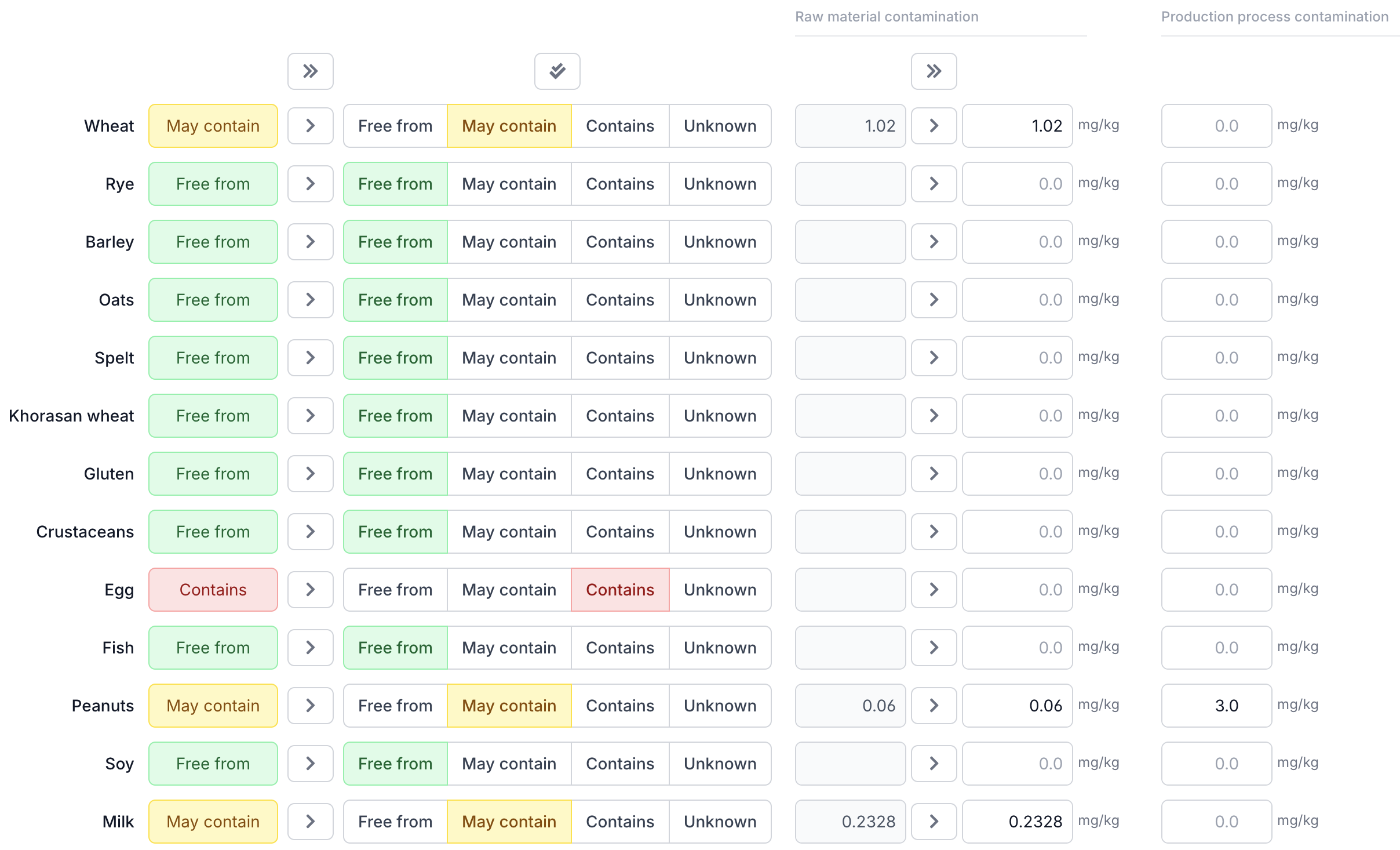
Step 1: Enter Cross-Contamination Data per Ingredient
Your raw material suppliers provide cross-contamination data in mg allergenic protein per kg. Open each ingredient in Eclarion and enter this value on the Allergens tab.
The mg/kg field is always visible — this is by far the most common type of contamination (evenly distributed throughout the ingredient). For particulate contamination (whole particles that end up intact in the product, such as sesame seeds) click + particulate next to the process contamination column. An additional input field for mg/particle appears.
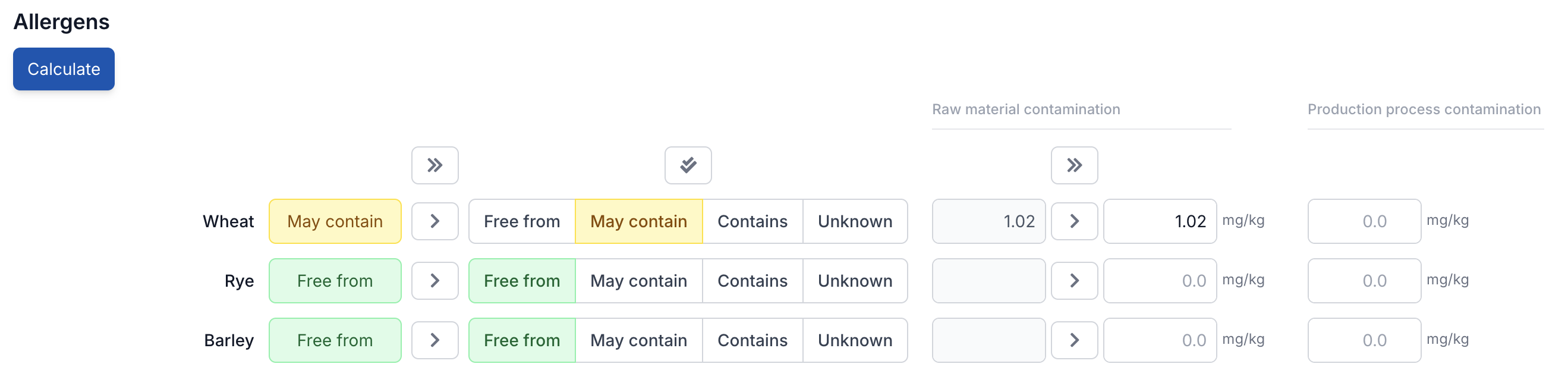
Tip: cross-contamination data is entered at the ingredient level, not on the end product. Open an ingredient from the bill of materials, go to its allergen tab and set the contamination values there. Do this for each ingredient — then click Calculate here and Eclarion does the rest.
Step 2: Enter Process Contamination
In addition to cross-contamination from raw materials, contamination can also occur in your own production process — think of residue on equipment after a product changeover, or stray particles on a shared production line.
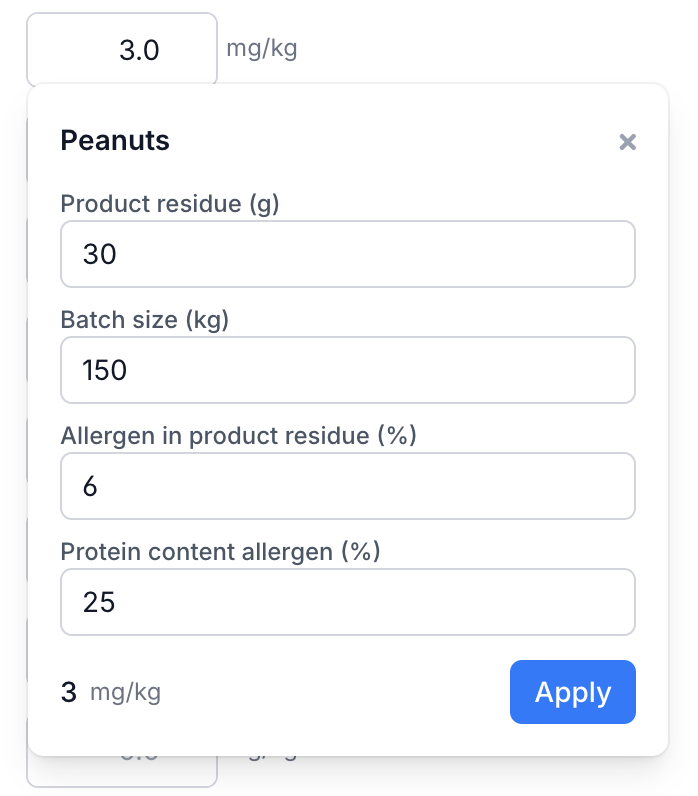
Enter these values in the Process contamination column on the right side of the allergen table. As with ingredient contamination, you can choose between mg/kg (homogeneous) and mg/particle (particulate via + particulate). For process contamination, you can also calculate the value using the calculator (calculator icon) which applies the QRA formula based on product residue, protein percentage and batch size.
Example: the same production line also runs a satay salad with peanut sauce. After cleaning, 30 grams of product remains in the mixing bowl. The satay salad contains about 6% peanut (25% protein). With a batch size of 150 kg, process contamination is: 30 g × 0.06 × 0.25 / 150 kg × 1,000 = 3.0 mg peanut protein per kg. Enter this for peanut in the process column, or let the calculator work it out.
Tip: process contamination can be set at any level — both on end products and on intermediates. Process contamination from an intermediate automatically flows through to the parent product via the bill of materials, together with the ingredient contamination.
Step 3: Calculate From the Bill of Materials
Once all ingredients have their cross-contamination data, open your end product and click Calculate at the top of the allergen table. This calculates in one go:
- The allergen status per allergen (Free from, May contain, Contains) based on the bill of materials
- The contamination values at recipe level, weighted by each ingredient's percentage
In a single click, Eclarion calculates the total cross-contamination from the entire bill of materials — including compound ingredients and process contamination at every level. Calculated values appear in the grey column on the left. Your own values on the right stay put.
Copy to the Active Column
Copy the calculated values using the copy button (>) per row, or use the copy all button (») at the top to copy everything at once. This applies to both allergen statuses and contamination values.

View the Breakdown
Click on a calculated contamination value to see the breakdown. The dialog shows which ingredients contribute — in this case, gluten contamination comes from two sources.
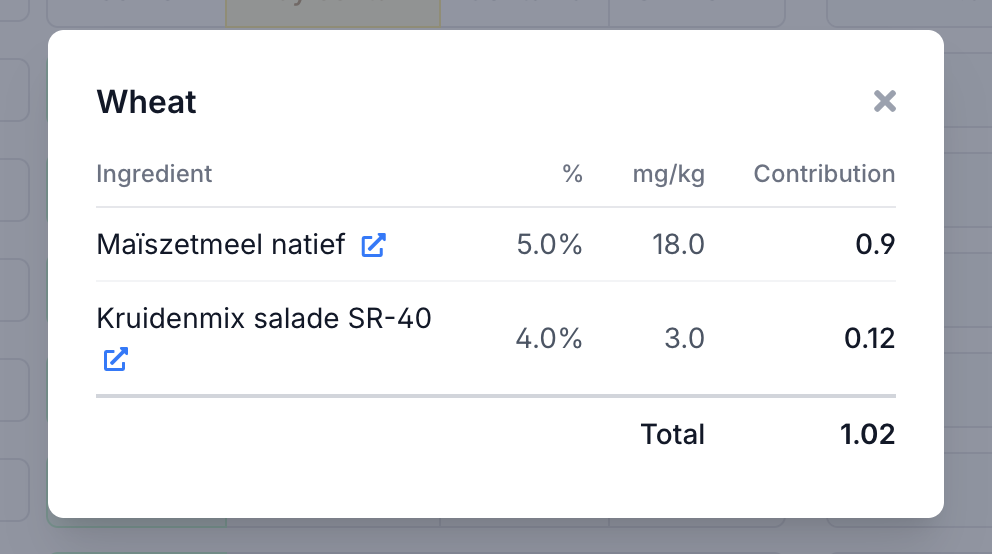
For each ingredient you see its percentage in the recipe, the source value in mg/kg and its contribution to the total. This lets you see at a glance which supplier brings in the most risk.
Calculate PAL
Scroll down to the PAL Assessment section below the allergen table. Enter the consumption size and click Calculate PAL. The consumption size is the amount a consumer realistically eats in one sitting - this is not always the same as the portion size on the label. For each allergen, the Hazard Quotient (HQ) is calculated: HQ = (contamination in mg/kg × consumption size in kg) / reference dose. If HQ exceeds 1, PAL is required.
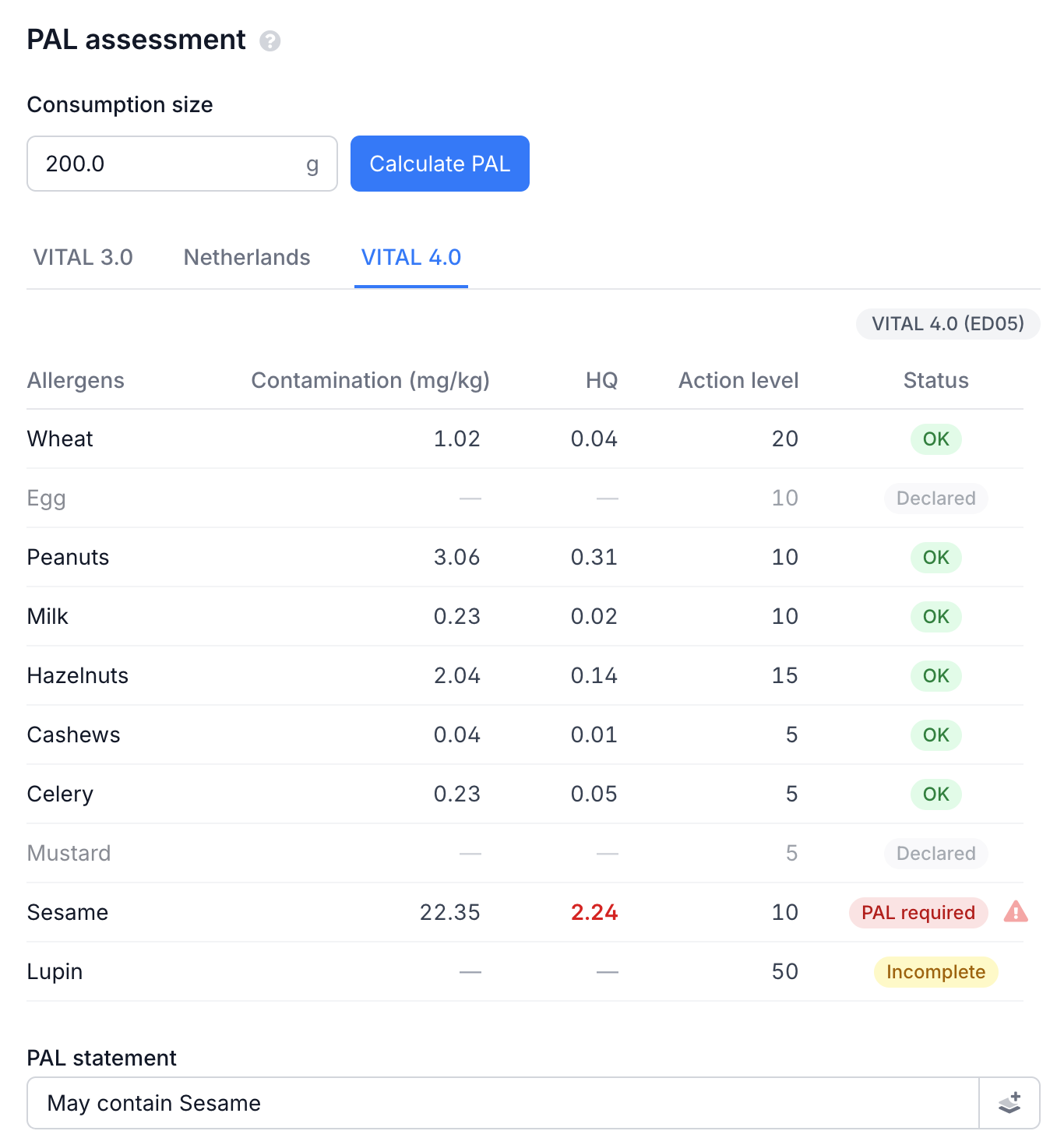
The table shows for each allergen the contamination at recipe level, the HQ (red when above 1), the action level and the status. Switch between tabs to see the difference per standard.
Statuses
OK contamination below threshold. No "may contain" needed.
PAL required contamination above threshold. Set the allergen status above to "May contain".
PAL required ⚠ above threshold, but the allergen status has not been updated yet.
Incomplete status is "May contain" without contamination data. Enter data or remove "May contain".
Declared the allergen is an ingredient. A "may contain" warning is not permitted here.
PAL Statement
Eclarion automatically generates the full "may contain" text in all languages you have configured — no manual translation needed. The text appears below each standard's table and is directly editable. Cereal types are named specifically when known (wheat, rye, barley, oats). When the source cannot be specified, "gluten-containing cereals" is used.
Standards
Eclarion calculates PAL for three standards:
| Standard | Based on | When to use it |
|---|---|---|
| Netherlands | NL ED05 (Staatscourant 2025) | Dutch market |
| VITAL 3.0 | ED01 values | Export to stricter markets. Lower thresholds |
| VITAL 4.0 | ED05 values | International. Comparable to NL ED05 |
Reference doses per standard are based on the Staatscourant 2025-14337 (NL ED05) and the VITAL 4.0 Summary by the Allergen Bureau (VITAL 3.0/4.0). See all reference doses per allergen in a full overview.
The Gluten Exception
Under all standards, the action level for gluten-containing cereals is capped at 20 mg/kg. This can mean PAL is required for gluten even when HQ is below 1. This cap protects coeliac patients — and it also applies to the total: if you process multiple cereal types that are each below 20 mg/kg individually but exceed it combined, the contributing cereals are named specifically in the PAL statement. Source: NVWA Allergen Policy Q&A.
Tip: set which standard appears first via Settings > General > Preferred standard. All standards remain available through the tabs.
PAL on Your Specification
To show the PAL assessment on your product specification:
- Go to Settings and open your specification layout
- Scroll to PAL Assessment
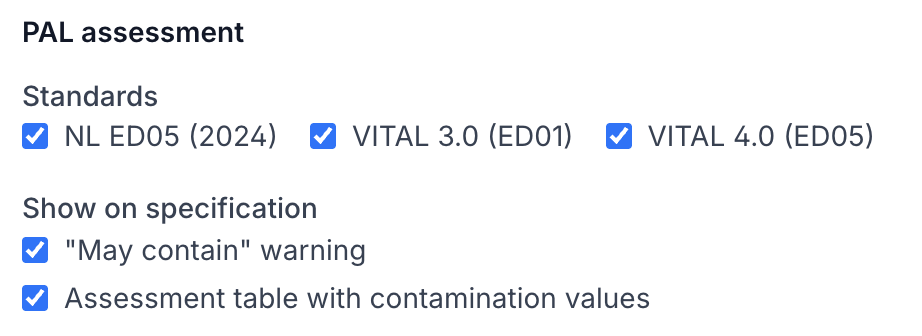
- Check the desired standards
- Choose what to show:
- "May contain" warning — the text for the label
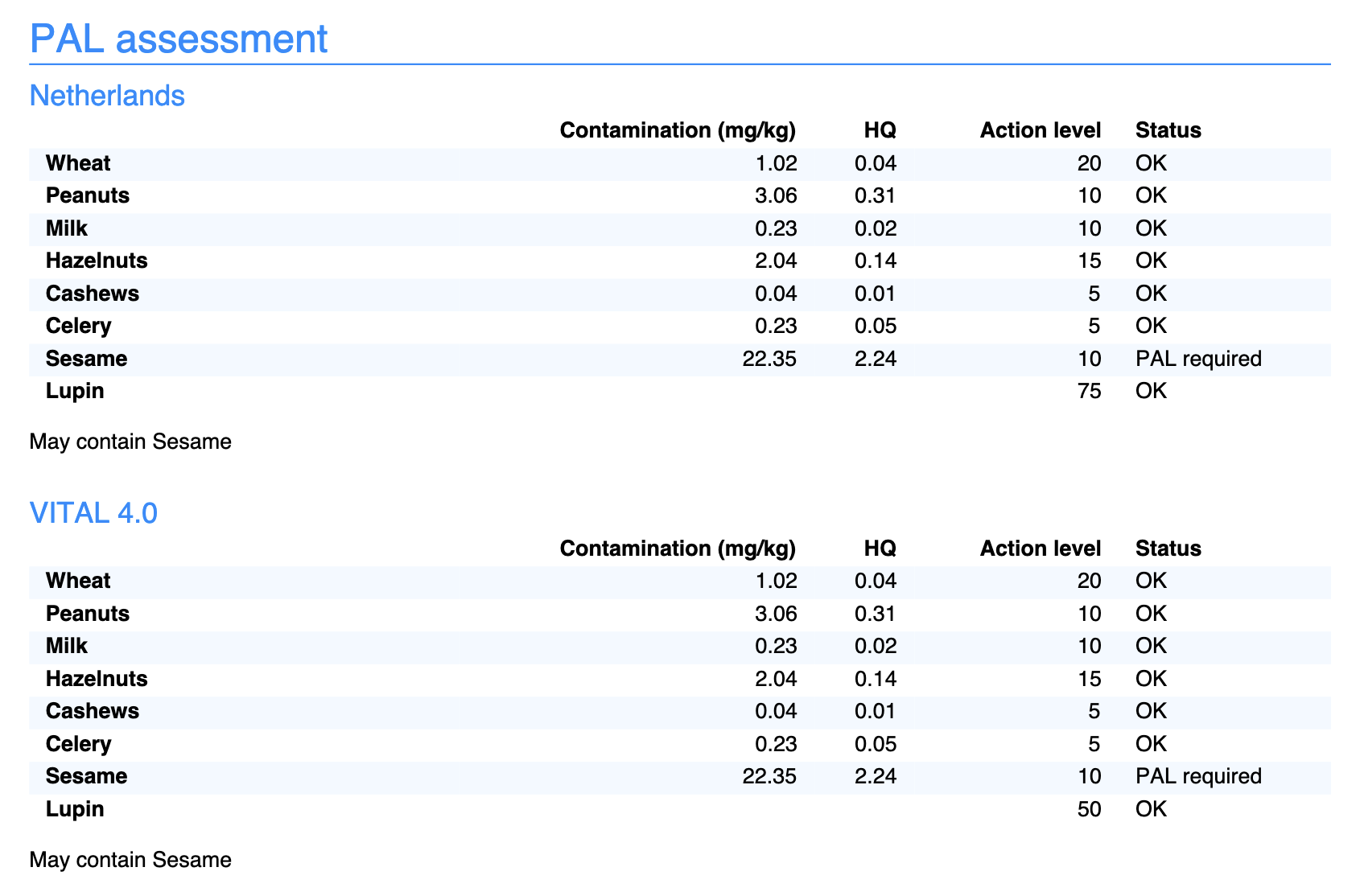
- Assessment table — the table with HQ values and action levels
You can use a different layout per market with different standards. Your Dutch specification gets NL ED05, your export specification gets VITAL 3.0.
Particulate Contamination
For particulate contamination, HQ is calculated differently:
HQ = mg allergenic protein per particle / reference dose
Portion size plays no role, because a single particle already represents the full risk. Say a sesame seed ends up in a sesame-free bread product via a shared production line, totalling about 4 mg of protein. The reference dose for sesame is 2 mg (NL ED05), so the HQ is 2.0: above threshold, PAL required.
An ingredient can have both homogeneous contamination (mg/kg) and particulate contamination (mg/particle) for the same allergen. Eclarion includes both in the assessment. Click + particulate to reveal the additional input field.

Compound Ingredients
Working with compound ingredients, like a dressing or spice mix? Calculate from the inside out:
- Open the compound ingredient (e.g. the spice mix)
- Click Calculate and copy the contamination values
- Go back to the end product and click Calculate again
This way contamination values flow correctly from sub-ingredient to compound ingredient to end product. Process contamination from each intermediate level is included automatically.
Frequently Asked Questions
Why does the PAL statement differ per standard?
Reference doses (thresholds) differ. VITAL 3.0 uses lower thresholds than NL ED05. An allergen can be OK under one standard and require PAL under another.
What if my supplier hasn't provided contamination data yet?
The calculation skips that ingredient. If an allergen is set to "May contain" without data, the status shows "Incomplete". Add the data once your supplier provides it.
Can I edit the "may contain" text?
Yes, but stick to the permitted wordings: "May contain [allergen]" or "Not suitable for people with [allergen] allergy". Other phrasings may not be compliant with regulations.
Why is an allergen shown as "Declared"?
The allergen is an ingredient in the product (status "Contains"). A "may contain" warning is not permitted here — the allergen is already in the ingredients list.
How does it work with compound ingredients?
Calculate PAL on the compound ingredient first (e.g. your dressing or spice mix) and copy the contamination values. Then calculate the end product. This ensures values flow through correctly.
What is the difference between ingredient and process contamination?
Ingredient contamination comes from your suppliers — cross-contamination already present in the ingredient when you receive it. Process contamination occurs in your own production environment — residue on equipment, particles on shared lines. Eclarion adds both sources together for the PAL assessment.